


Land Registry and Cadastre Information SystemLand registry and property data
Public Property Portal
Public Property PortalPublic Asset Management
All your real estate operations on a single platform: sale, purchase, leasing, renting out, unjust occupation fee (ecrimisil), easement right, donation, transfer, allocation, summary schedule, barter, and acquisition through expropriation.
OverviewExplore
How Public Property Portal Works
Land Registry and Cadastre Information System, Spatial Address Registration System, summary schedule, unjust occupation fee, easement, sale-lease, archive, and corporate integration processes are managed on the same platform.
Spatial Address Registration SystemAddress and location verification
5018 Summary SchedulesCourt of Accounts-compliant summary outputs
Unjust Occupation FeeOccupation and fee processes
Easement RightRight establishment and tracking management
BarterMutual property exchange flow
Donation & TransferAcquisition and transfer records
Sale-LeaseRevenue and contract management
E-SignatureApproval and signature flows
Electronic Document Management SystemCorrespondence and document integration
ArchiveFile and document storage
Overview
Public Property Portal: Manage Your Public Property Management Processes on a Single Platform
Public Property Portal enables public institutions and organizations, municipalities, and infrastructure operators to manage all operations on properties they own (such as allocation, transfer, leasing, sale, easement, donation, and unjust occupation fee) through a single system.
★
Public Property Portal
360°
provides end-to-end digital process management
Public Property Portal enables public institutions and organizations, municipalities, and infrastructure operators to manage all operations on properties they own (such as allocation, transfer, leasing, sale, easement, donation, and unjust occupation fee) through a single system.
♦
Highlights
Map
It enables property data to be displayed on a GIS base together with location and attribute information.
It enables property data to be displayed on a GIS base together with location and attribute information. Data is managed on the map with layer addition, filtering, and drawing tools.
0172%
0284%
Format Support
It works with the ability to fully read and write vector data in DGN, DWG, DXF, GML, KML, KMZ, NCZ, TAB, and SHP formats.
It works with the ability to fully read and write vector data in DGN, DWG, DXF, GML, KML, KMZ, NCZ, TAB, and SHP formats.
0178%
0288%
Detailed Reports
All ownership, transfer, allocation, easement, leasing, and sale processes for properties can be reported through the system.
All ownership, transfer, allocation, easement, leasing, and sale processes for properties can be reported through the system.
0184%
0292%
Capabilities
The Public Property Management Process
Managed from Start to Finish
-
01.All Property Acquisition and Management Work ProcessesUnjust occupation fee, leasing, renting out, sale, purchase, transfer, barter, easement right, registration, allocation, and all 5018 Court of Accounts reports are managed from a single point in a GIS-based structure.
-
02.Land Registry and Cadastre Information System Person-Parcel QueryThis screen enables querying of the property records of individuals through integration with Land Registry and Cadastre Information System.
-
03.Civil Registry and Address QueryThis screen enables querying of civil registry records and address data based on personal information. The user can query by entering information such as Turkish ID number, date of birth, or relationship type.
-
04.Title-Registered Property InformationThis screen enables the detailed records of title-registered properties to be displayed.
-
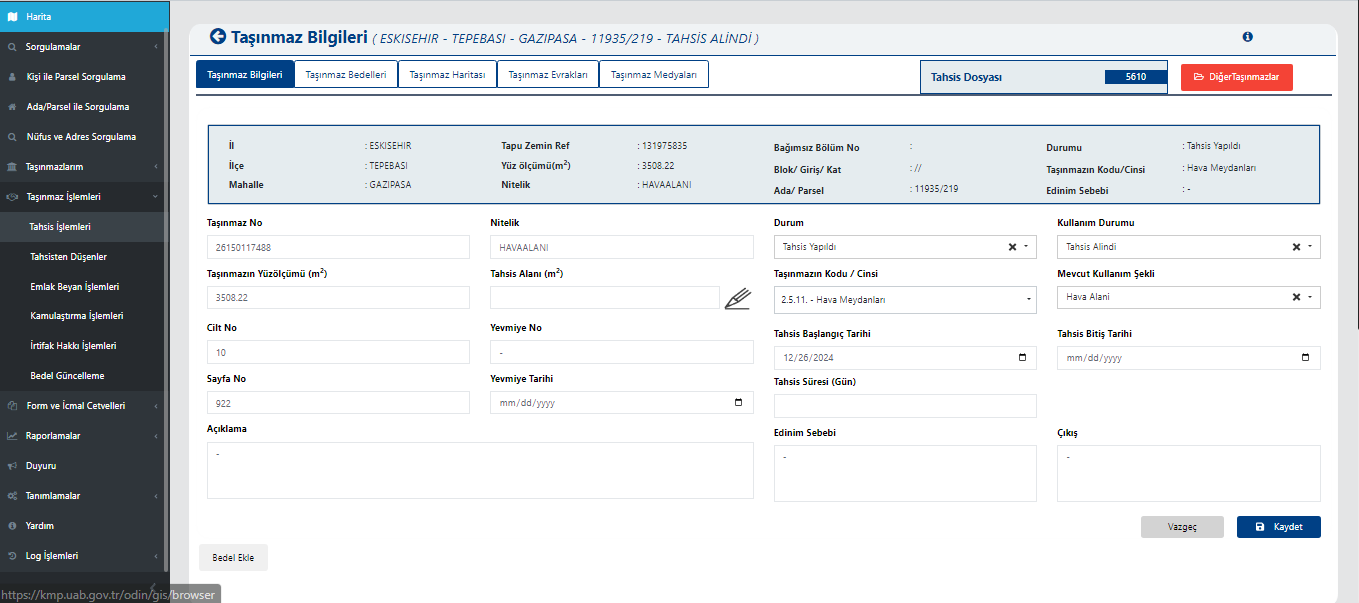
05.Allocation ListThis screen enables the management of all property records related to allocation operations. The user can view and filter records by fields such as property number, province, district, neighborhood, block, and parcel.
-
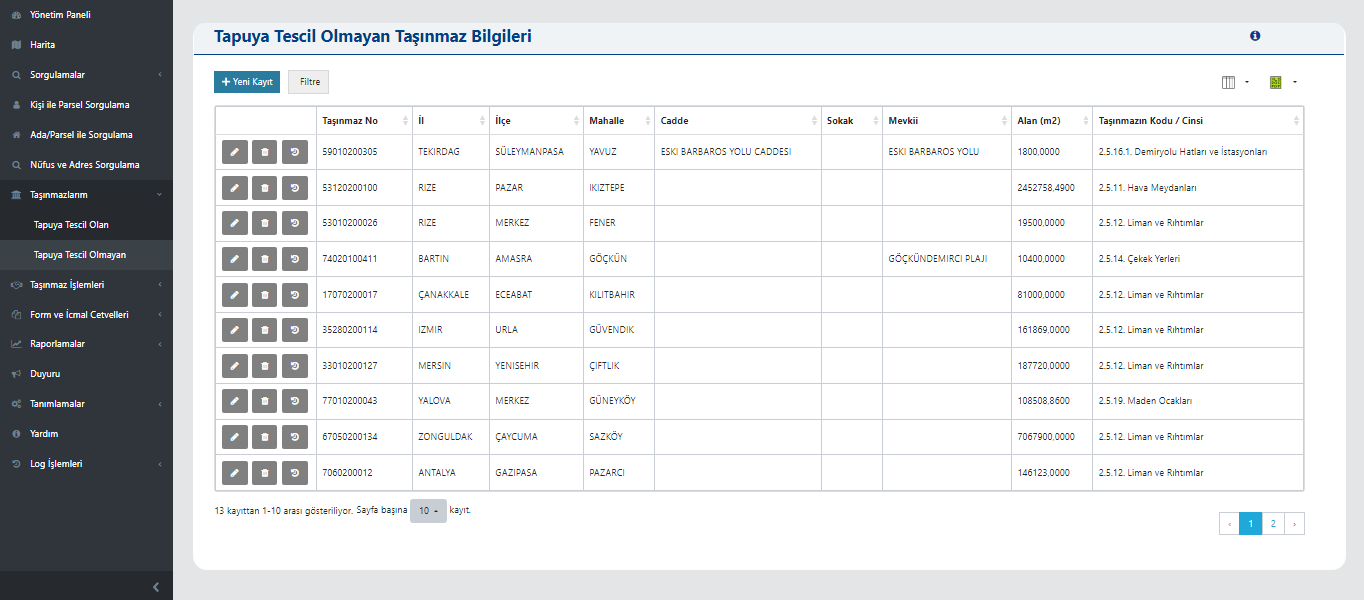
06.List of Items Removed from AllocationThis screen shows the list of properties whose allocation process has been completed and whose allocation record has been ended.
-
07.Value Update ListThis screen is used to view and manage the value update operations of properties.
Core Competencies
Modules that support Public Property Portal operations
All your real estate operations on a single platform: sale, purchase, leasing, renting out, unjust occupation fee (ecrimisil), easement right, donation, transfer, allocation, summary schedule, barter, and acquisition through expropriation.
Go to OverviewLand Registry and Cadastre Information System Person-Parcel Query
This screen enables querying of the property records of individuals through integration with Land Registry and Cadastre Information System.
Civil Registry and Address Query
This screen enables querying of civil registry records and address data based on personal information. The user...
Title-Registered Property Information
This screen enables the detailed records of title-registered properties to be displayed.
Allocation List
This screen enables the management of all property records related to allocation operations. The user can view records by fields such as property number, province, district, neighborhood, block, and parcel...
List of Items Removed from Allocation
This screen shows the list of properties whose allocation process has been completed and whose allocation record has been ended.
Value Update List
This screen is used to view and manage the value update operations of properties.
Capability Cards
Everything Public Property Management Requires
in a Single Platform
The main modules from the documentation were organized into corporate summary cards within the existing page structure.
Land Registry and Cadastre Information System Person
Land Registry and Cadastre Information System Person-Parcel Query
This screen enables querying of the property records of individuals through integration with Land Registry and Cadastre Information System.
Civil Registry Address
Civil Registry and Address Query
This screen enables querying of civil registry records and address data based on personal information. The user...
Title-Registered
Title-Registered Property Information
This screen enables the detailed records of title-registered properties to be displayed.
Allocation
Allocation List
The Allocation List area lets you track, control, and manage the related process from a single screen in line with corporate workflows.
Removed from Allocation
List of Items Removed from Allocation
The List of Items Removed from Allocation area lets you track, control, and manage the related process from a single screen in line with corporate workflows.
Value Update
Value Update List
The Value Update List area lets you track, control, and manage the related process from a single screen in line with corporate workflows.
Public Property
Public property management in one center
The Public property management in one center area lets you track, control, and manage the related process from a single screen in line with corporate workflows.
Title-Recorded
Summary Schedule of Title-Registered Properties
The Summary Schedule of Title-Registered Properties area lets you track, control, and manage the related process from a single screen in line with corporate workflows.
Resources
Explore our promotional materials
Access presentation and promotional content about Public Property Portal from this area.
Product Tour
Explore Public Property Portal
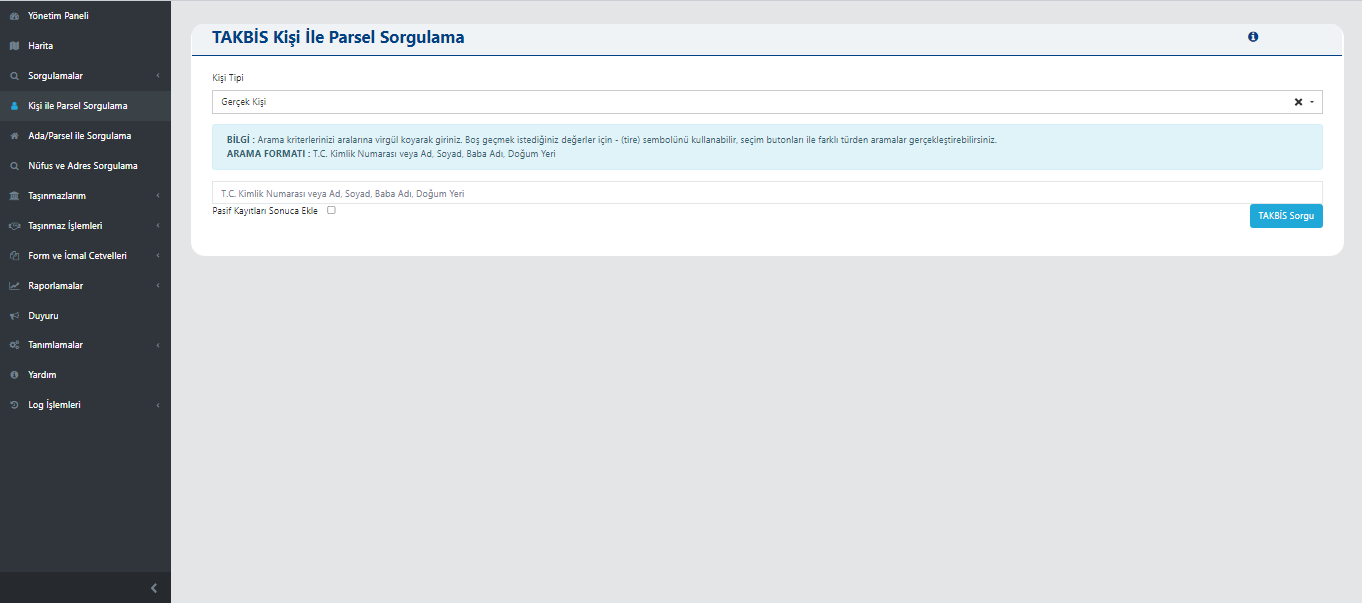
Land Registry and Cadastre Information System Person-Parcel Query
This screen enables querying of the property records of individuals through integration with Land Registry and Cadastre Information System.
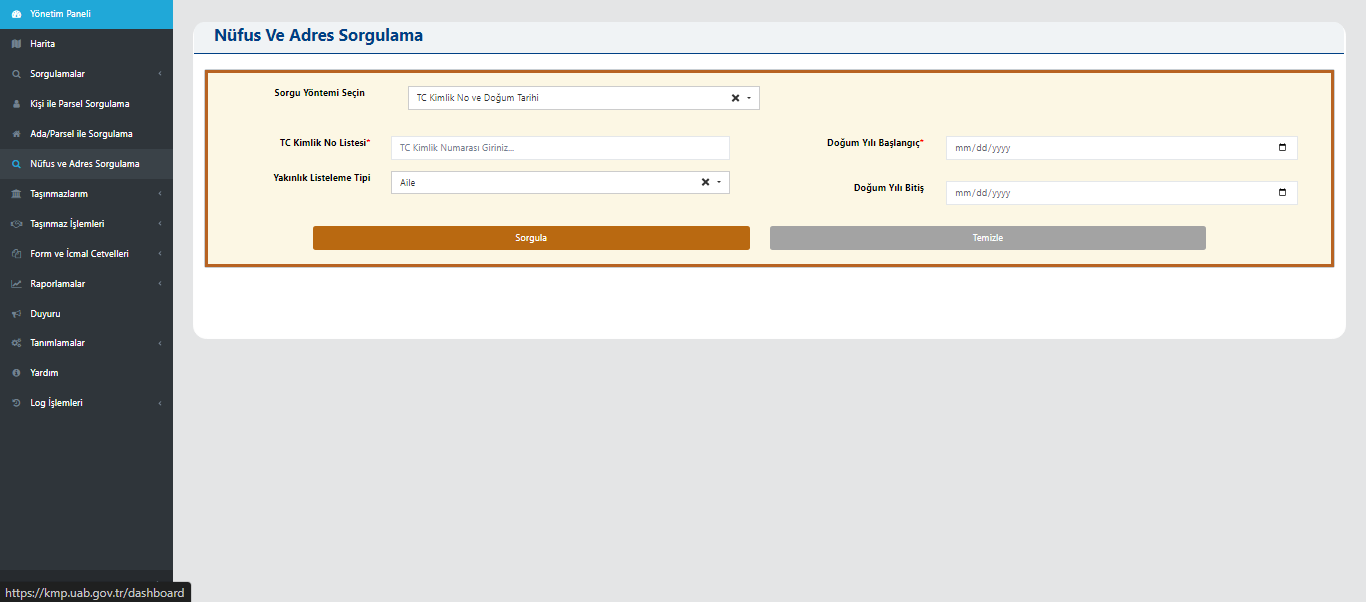
Civil Registry and Address Query
This screen enables querying of civil registry records and address data based on personal information. The user can query by entering information such as Turkish ID number, date of birth, or relationship type.
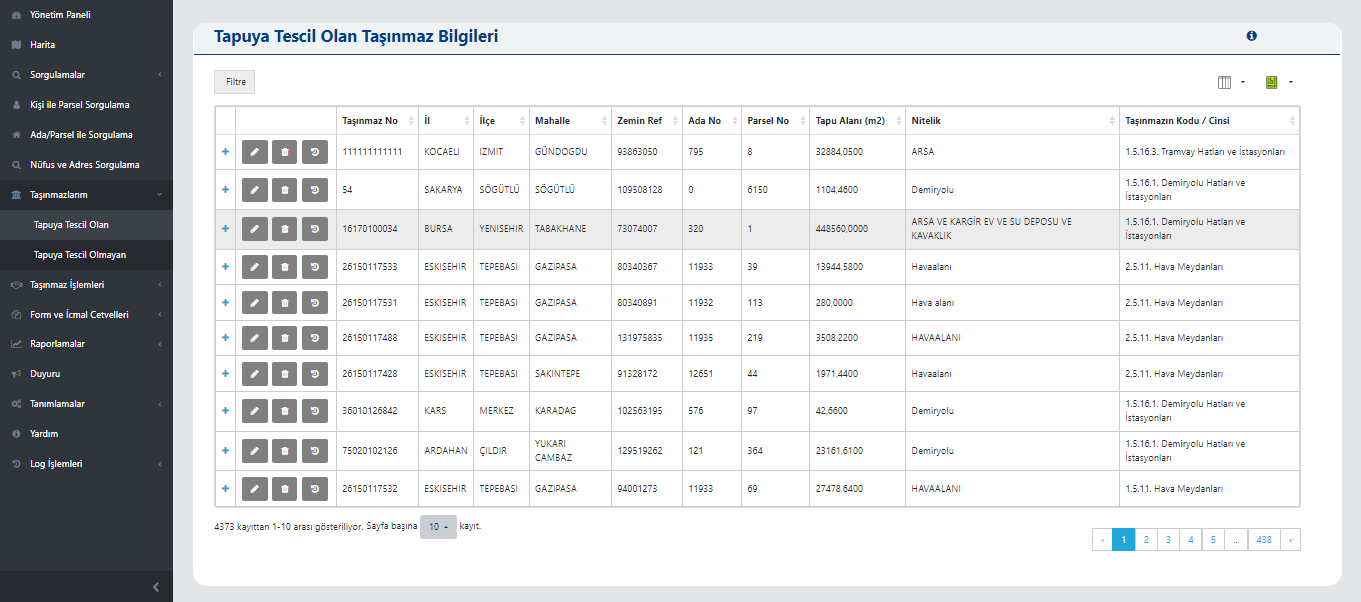
Title-Registered Property Information
This screen enables the detailed records of title-registered properties to be displayed. The user can examine information such as province, district, neighborhood, block, parcel, title area, attribute, and property code in a table.
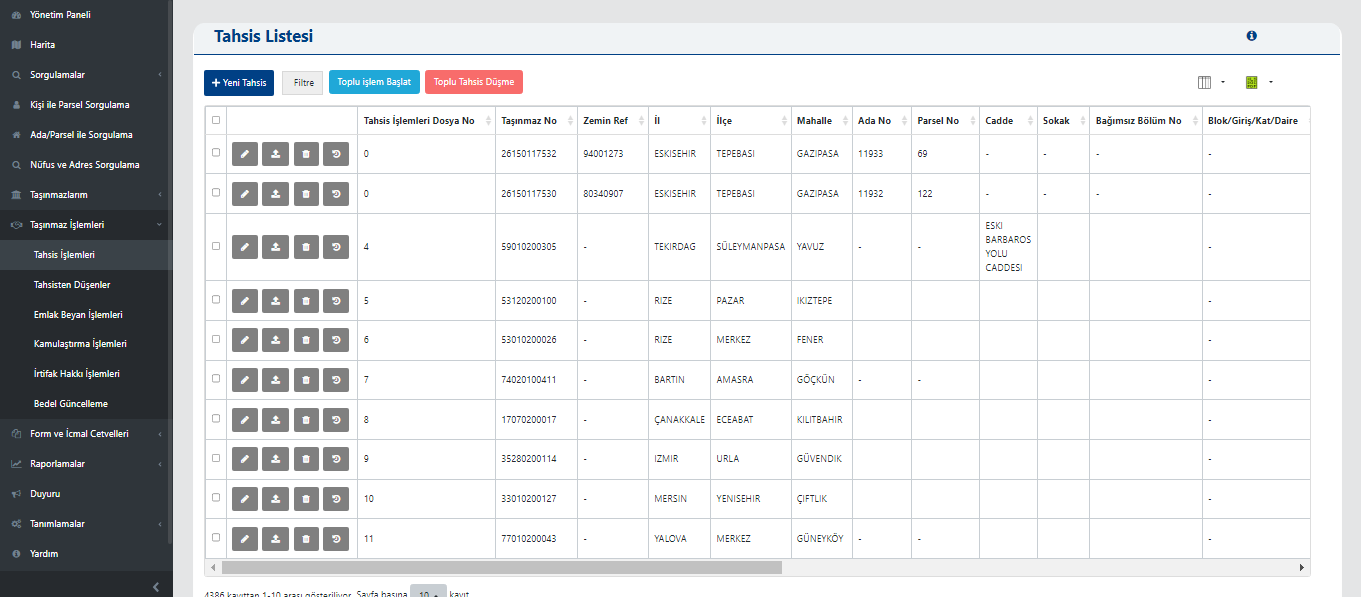
Allocation List
This screen enables the management of all property records related to allocation operations. The user can view and filter records by fields such as property number, province, district, neighborhood, block, and parcel.
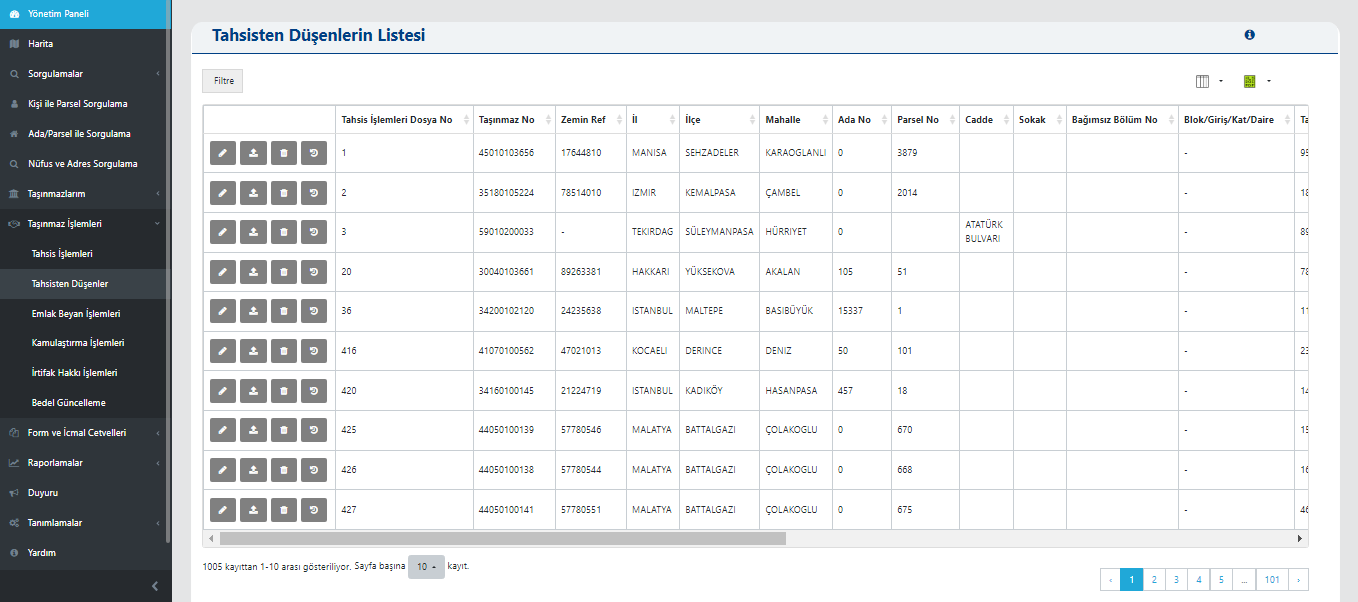
List of Items Removed from Allocation
This screen shows the list of properties whose allocation process has been completed and whose allocation record has been ended. The user can view past allocation records by information such as property number, ground reference, province, district, neighborhood, block, and parcel.
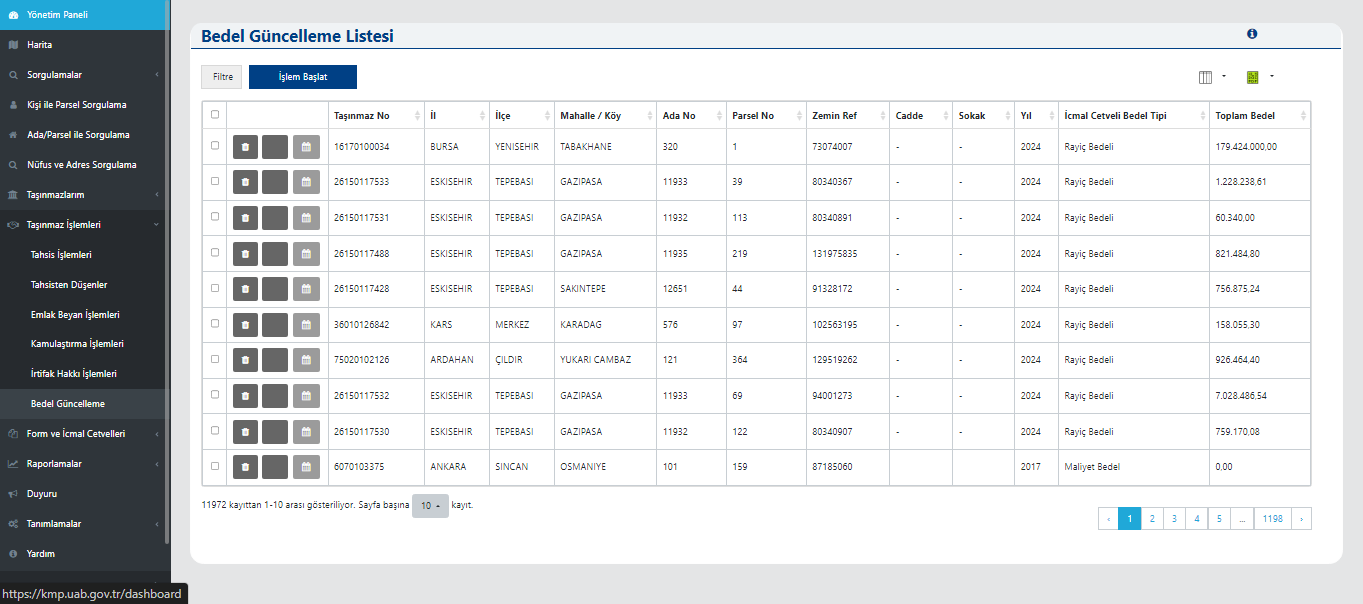
Value Update List
This screen is used to view and manage the value update operations of properties. The user can access the current values of registered properties by information such as property number, province, district, neighborhood, block, parcel, year, and total value.
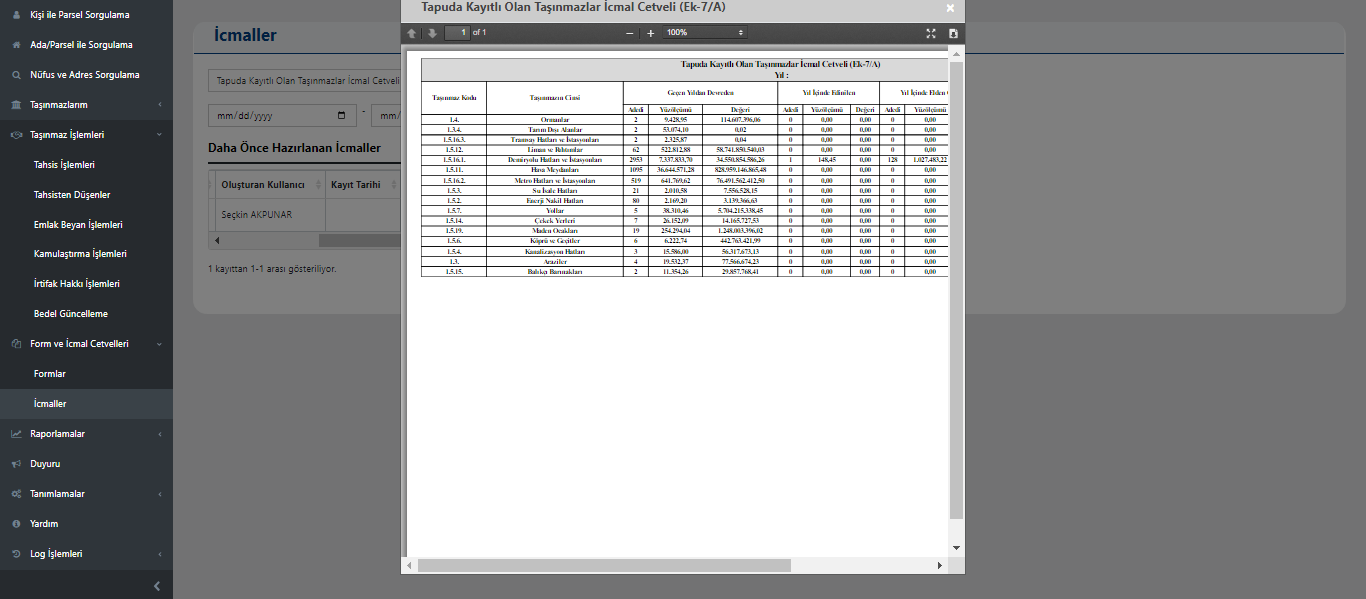
Summary Schedule of Title-Registered Properties
This screen shows the annual summary schedule of all properties owned by the institution. In the prepared schedule, the code, type, quantity, and value of each property are listed on an annual basis.
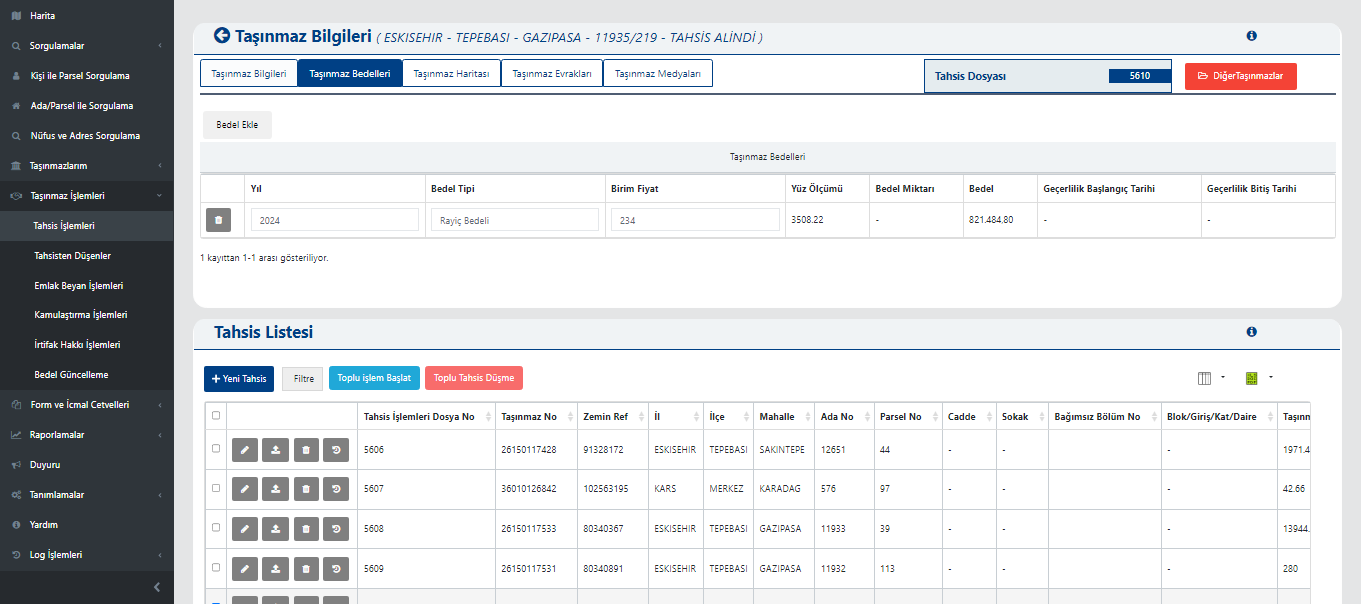
Property Values and Allocation List
This screen shows the annual value calculations and current allocation records of the selected property together. The upper section displays year, value type, unit price, area, total value, and validity dates.
Map
It enables property data to be displayed on a GIS base together with location and attribute information. Data is managed on the map with layer addition, filtering, and drawing tools.
Format Support
It works with the ability to fully read and write vector data in DGN, DWG, DXF, GML, KML, KMZ, NCZ, TAB, and SHP formats.
Detailed Reports
All ownership, transfer, allocation, easement, leasing, and sale processes for properties can be reported through the system.
Integration Compatibility
It works integrated with Land Registry and Cadastre Information System, Central Civil Registration System, Tax Office Automation Project, and e-Government automations; data sharing and verification operations are carried out through these systems.
FAQ
Quick answers about Public Property Portal
The product's core use cases and corporate contribution are summarized here.
Get in TouchPublic Property Portal enables public institutions and organizations, municipalities, and infrastructure operators to manage all operations on properties they own (such as allocation, transfer, leasing, sale, easement, donation, and unjust occupation fee) through a single system.
It enables property data to be displayed on a GIS base together with location and attribute information. Data is managed on the map with layer addition, filtering, and drawing tools.
All ownership, transfer, allocation, easement, leasing, and sale processes for properties can be reported through the system.
It works integrated with Land Registry and Cadastre Information System, Central Civil Registration System, Tax Office Automation Project, and e-Government automations; data sharing and verification operations are carried out through these systems.
It is fully compliant with Council of Ministers Decree No. 2006/10970, the Public Real Estate Regulation, and the provisions of Law No. 5018.
It manages all scenarios of your institution’s property management in a single system. It helps you progress in regulatory compliance. It supports you in passing Court of Accounts audits soundly and quickly. It reduces your staff costs and dependency. It provides total quality management. It zeroes out your bureaucracy, meeting, and communication costs; it eliminates the risk of communication breakdowns.
Public Property Portal
Digitize Your
Processes, Increase Control
Public Property Portal enables public institutions and organizations, municipalities, and infrastructure operators to manage all operations on properties they own (such as allocation, transfer, leasing, sale, easement, donation, and unjust occupation fee) through a single system.
Map
Format Support
Detailed Reports
Integration Compatibility